¶ What is DevStore Helper?
DevStore Helper is an app available on Windows, macOS (M series), and Linux that allows for deeper integrations with the DevStore itself. With the DevStore Helper, you can use features such as:
- One-click install your apps from DevStore directly to your Xbox.
- Let the helper handle the installation process for you.
- Deeper Integration Between DevStore and Your Console.
- Third-Party Controllers on Xbox.
¶ Requirements Checklist
Xbox Series X|S
Make sure you have an Xbox Series X or Series S. Note: Xbox One can run some PS2 games, but it's not powerful enough for most of them.
Developer Mode on Xbox
To run applications such as DevStore Helper, you need to enable Developer Mode. This allows you to install applications that aren't available from the Microsoft Store. If you haven't enabled Developer Mode yet, don't worry - we've got you covered here.
¶ Installations For Computers
You can find DevStore Helper app in Xbox Dev Store site,
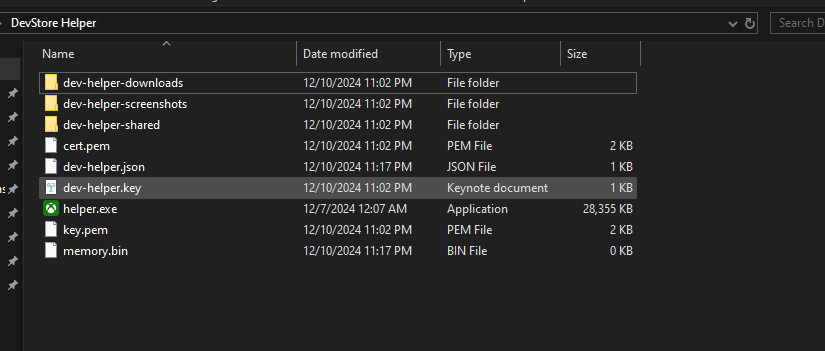
Once you download helper.exe then Make sure to create Folder then put helper inside
Then run helper.exe and type your IP Address without ports (IP Address Numbers can be found on Xbox Dev Home)
Make sure you have set username and password, they are required to use DevStore Helper.
Type your username then password.
Once you have done that then DevStore Helper will generate some folders and files in Helper Folder like in the Picture: